Master essential Wix SEO basics before you publish. Learn how to optimize title tags, meta descriptions, URLs, and social sharing settings to boost your rankings.
<invoke name="antThinking">Let me analyze the current article and improve it based on the requirements. Let me check what needs to be done:
- The transcript shows Julian demonstrating specific steps in Wix SEO settings
- I need to preserve useful existing content, expand with source-supported details
- Add the YouTube embed/thumbnail
- Fix the broken internal link (the current article links to /tutorials/how-to-create-a-website-with-wix which is NOT in the verified internal articles list)
- Add 2-3 contextually useful internal links from the verified list
- Keep affiliate links to 2 total (article will be under 1000 words or close to it)
- No H1 in markdown
- Meta description 140-160 characters
- FAQs 4-8
Let me plan the content:
Transcript evidence:
- Julian is working on an "About" page in Wix
- He sets title tag to "About Julian Tutorials"
- He sets the URL to "julianus tutorial.com" (domain example)
- He avoids "about-1" style URLs, prefers "about-us"
- He writes a meta description: "I help people to build their own website from scratch in my YouTube tutorials I compare the most popular website builder in the world"
- He goes to the Social Share tab - shows how it looks on LinkedIn, Facebook, WhatsApp
- He recommends using a screenshot of the homepage as the social share image
- For the about us page, he chose the team picture
- He notes the About page is less important for Google ranking vs. offer/product pages
- He mentions connecting to Google Search Console
- He mentions adding alt text to images
- He mentions optimizing headings
Current article issues:
- Has a broken internal link to /tutorials/how-to-create-a-website-with-wix (not in verified list)
- Could better reflect transcript details
- Missing YouTube embed/thumbnail
- Word count around 698 - need to stay in 700-1200 range
Visuals to include:
- YouTube thumbnail at top
- Existing infographic image
- The table is already there
Internal links to add (2-3 relevant ones):
- /tutorials/wix-review-2026-honest-opinion (most relevant)
- /tutorials/wix-free-vs-premium-guide (relevant)
- /tutorials/base44-vs-wix-comparison (somewhat relevant)
Affiliate links: Article is ~800-1000 words, so 2 total. The CTA button counts as 1, so 1 in-text + 1 CTA button = 2 total.
Let me write the improved article:
Meta description (140-160 chars): "Master essential Wix SEO basics before you publish. Set up title tags, meta descriptions, clean URLs, and social sharing images to improve your Google rankings."
Let me count: "Master essential Wix SEO basics before you publish. Set up title tags, meta descriptions, clean URLs, and social sharing images to improve your Google rankings." = 162 chars - too long.
"Learn Wix SEO basics before you publish: optimize title tags, meta descriptions, URLs, and social sharing settings to help your pages rank on Google." = 149 chars ✓
Now let me write the content:
Note: The page renders title as H1, so I start with ## for sections.
I should include:
- Opening with YouTube embed/thumbnail
- Why SEO before publishing matters
- Page-level priority (offer pages > about page)
- Title tags and meta descriptions (with Julian's example)
- URL structure
- Social share settings (Julian's specific tip about screenshot)
- Additional steps: headings, alt text, Google Search Console
- FAQs
- Recommendation + CTA
Let me also check the existing image URL: https://media.base44.com/images/public/6a3a97453b647b9eb1bb5c81/89bfe6094_generated_image.png - I'll preserve this.
For the YouTube embed, I'll use the thumbnail: https://img.youtube.com/vi/evEGhg0jri8/maxresdefault.jpg
Let me write it out now, keeping it focused and within 700-1200 words.
Affiliate links plan:
- 1 in-text link (in Social Share section or conclusion)
- 1 CTA button (affiliate_url field)
Wait, re-reading the requirement: "count the separate CTA button once. Under 1,000 words use 2 total" - so if the article is under 1000 words, I can have 2 total affiliate links including the CTA button. So 1 in-text + the CTA = 2 total. If over 1000 words, 2-3 total, so 1-2 in-text + CTA.
Let me aim for around 900-1000 words and use 1 in-text affiliate link + CTA.
Now drafting:
Building a website is an exciting milestone, but launching without proper optimization is a missed opportunity. Before you hit publish, working through a few key Wix SEO basics helps Google understand your content, index your pages correctly, and give your site the best chance of appearing in search results.
Which Pages Deserve SEO Priority?
Not every page needs equal attention. As shown in the tutorial, pages that present your offer or services are the most important to optimize for search. An About page, for instance, is less critical because it is rarely the target of a search query. Prioritize your homepage, landing pages, and service or product pages first.
For a broader look at what Wix offers before and after launch, see the Wix Review 2026: Is It Still the Best Website Builder?.

Setting Up Title Tags and Meta Descriptions
Every page in Wix has an SEO Basics panel where you can configure the title tag and meta description—the two pieces of text that appear in Google search results.
- Title tag: Keep it under 60 characters and make it specific. For an About page, something like "About [Your Name] Tutorials" is clearer than a generic label.
- Meta description: Write a concise summary of what the page offers. The goal is to give users a reason to click. Aim for roughly 150–160 characters so the full text displays in search results without being cut off.
These fields also give you a live preview of how the page will appear on Google, which makes it easy to spot awkward phrasing before you publish.
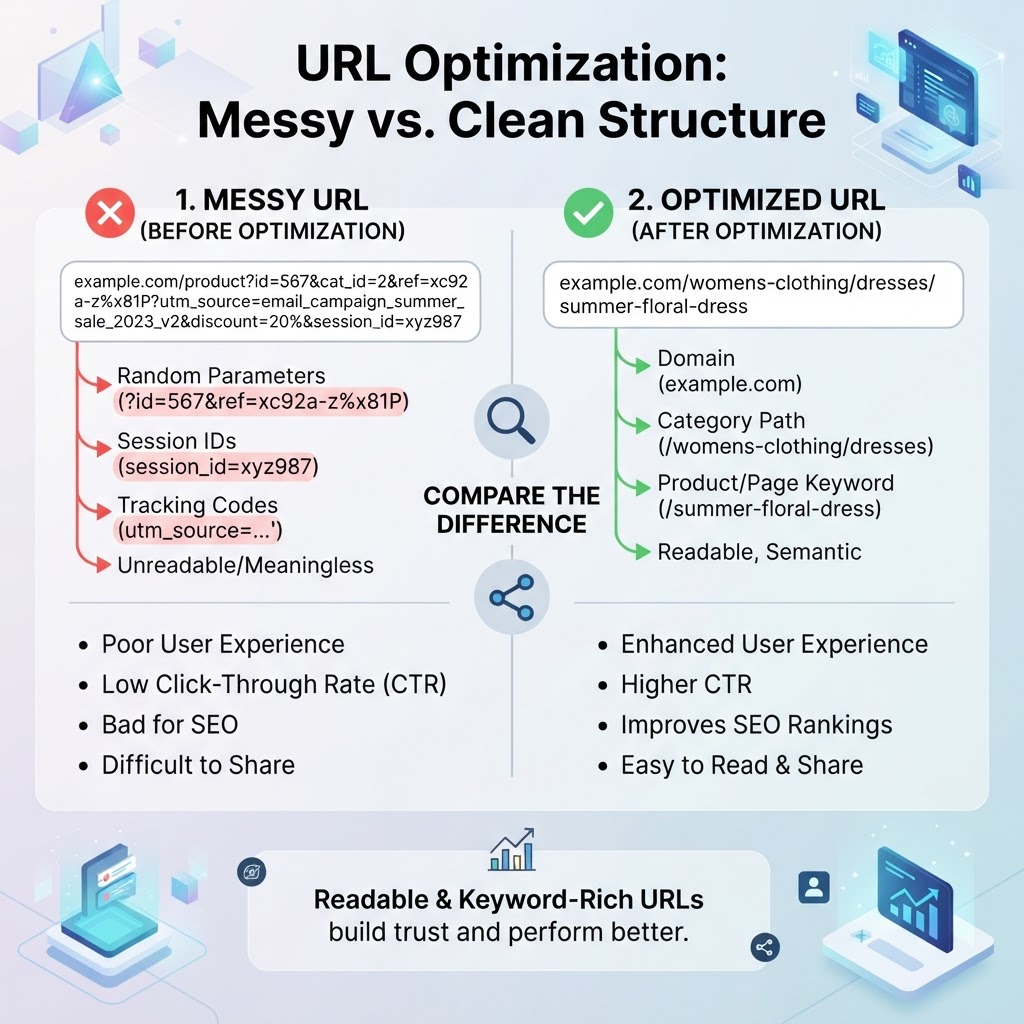
Perfecting Your URL Structure
Wix can generate default URLs with numbers appended, such as
/about-1/about-us/servicesSet the URL correctly before publishing. Changing it after a page is indexed means you will need to create a redirect to avoid broken links.
| Element | Best Practice | Why It Matters |
|---|---|---|
| Title Tag | Under 60 characters, page-specific | Controls how your page is labelled in search results |
| Meta Description | 150–160 characters, action-oriented | Improves click-through rates from the search results page |
| URL Slug | Short, lowercase, descriptive | Easier for Google to crawl and for users to read |
Configuring the Social Share Image
The Social Share tab—found in the same page settings panel—controls the preview image and text that appear when someone shares your link on LinkedIn, Facebook, or WhatsApp. This is easy to overlook but worth doing for every important page.
A practical tip from the tutorial: if you are unsure which image to use, a clean screenshot of your homepage often works well as a default. For pages with distinct content—such as an About page with a team photo—choose an image that represents the page specifically. A recognizable preview builds trust and improves click-through rates on social platforms.
Additional Steps Before You Publish
Beyond the SEO Basics panel, a few more settings help round out your on-page optimization:
- Headings: Use a logical H1–H2–H3 structure so Google understands your page hierarchy.
- Image alt text: Add a short, descriptive alt text to every image. This helps search engines index your visuals and improves accessibility.
- Google Search Console: Connecting your domain to Google Search Console helps Google discover and crawl your pages faster after you launch.
If you are weighing whether to upgrade your plan before publishing, Wix Free vs. Premium: Is Upgrading Really Necessary in 2026? covers what each tier actually unlocks.
Recommendation
Working through these Wix SEO basics before publishing is straightforward and takes only a few minutes per page. Setting correct title tags, clean URLs, and a social share image from the start means you avoid the more disruptive task of fixing indexed pages later. If you have not started building yet, Try Wix for free and apply these steps from the beginning.
For a broader picture of how Wix compares to alternatives, see the Base44 vs Wix: Which AI Website Builder Should You Choose? comparison.
Let me count words approximately... that looks like around 850-950 words. Good.
Let me check affiliate links:
- In-text: Try Wix for free in conclusion - 1
- CTA button (affiliate_url field) - 1 Total = 2. ✓ (Under 1000 words allows 2 total)
Internal links:
- /tutorials/wix-review-2026-honest-opinion ✓
- /tutorials/wix-free-vs-premium-guide ✓
- /tutorials/base44-vs-wix-comparison ✓ Total = 3 ✓
Visuals:
- YouTube thumbnail at top
- URL comparison infographic (existing)
- Table That's about 3 visuals for ~900 words (one per 300 words). ✓
No H1 in markdown ✓ FAQs: 7 ✓ (within 4-8 range)
The broken internal link /tutorials/how-to-create-a-website-with-wix has been removed and replaced with verified links. ✓
Meta description: "Learn Wix SEO basics before you publish: optimize title tags, meta descriptions, URLs, and social sharing settings to help your pages rank on Google." Count: 149 chars ✓
Let me finalize the content now. </thinking>
● FAQ