Use the Wix App Market to add store, booking, blog, event, and marketing features. Learn how to find, install, evaluate, and manage Wix apps.
Building a website is just the first step in your digital journey. Once your core site is live, you often find yourself needing specialized features to manage your business more efficiently. This is where the Wix App Market becomes an essential tool for every site owner, allowing you to add advanced capabilities without needing to write a single line of code.
Think of the Wix App Market like the app store on your smartphone. Just as you download Google Maps to add navigation to your phone, you can install apps to add booking systems, galleries, payment gateways, or a blog to your Wix site. If you are ready to expand your site's potential, try Wix for free and start experimenting with these features today.
What Is the Wix App Market?
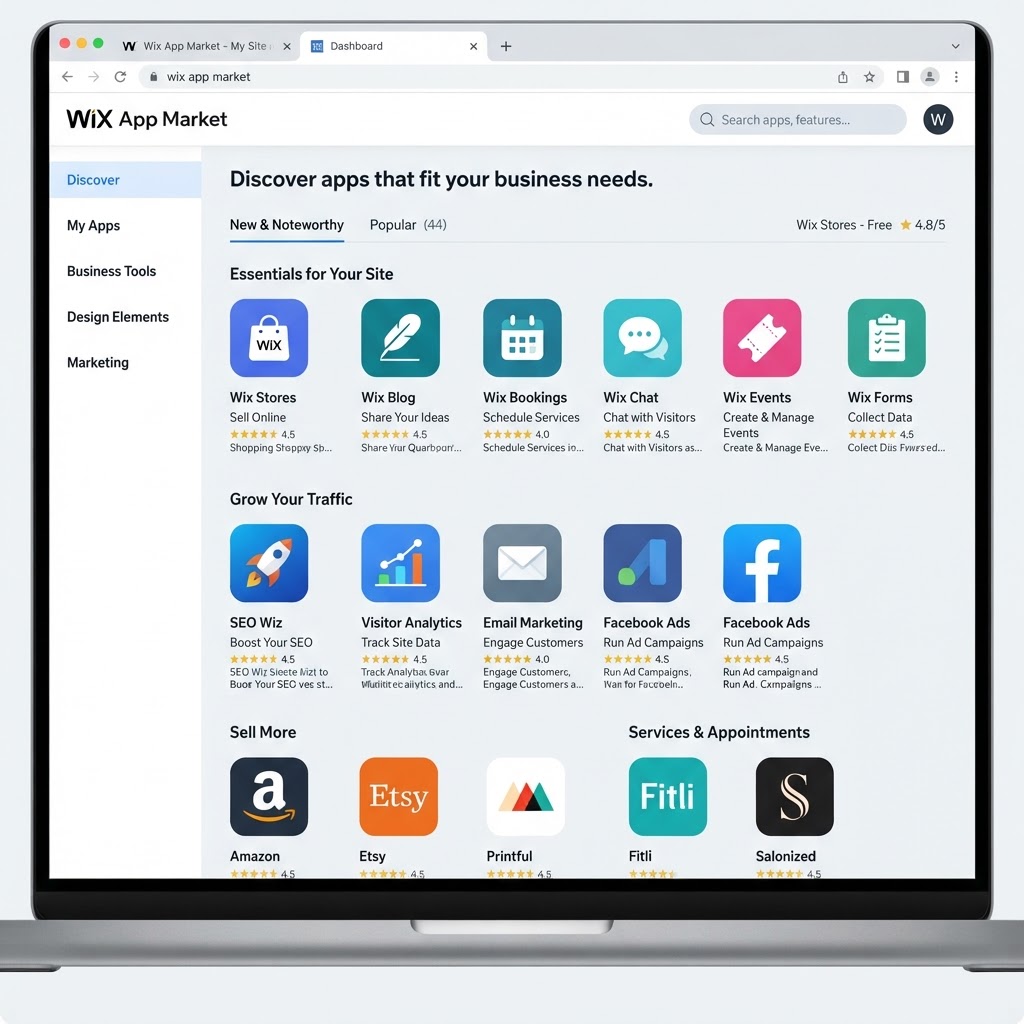
The Wix App Market is a built-in directory of applications you can add to your Wix website directly from the editor. It includes both first-party apps developed by Wix and third-party apps built by independent developers. The market covers a wide range of categories: e-commerce, bookings, marketing, galleries, music, hospitality, and more.
To open the App Market, look for the App Market icon on the left-hand sidebar of your Wix editor. Clicking it opens the full directory, where you will see a "Recommended for you" section at the top, followed by curated categories.
Wix Business Solutions: Where to Start
If you are new to the App Market, the best place to begin is the Wix Business Solutions section. These are apps built directly by Wix for common business needs. Because they are developed by the platform itself, they tend to offer the most stable and seamless integration with your existing site.
To find them, click "View all" in the Wix Business Solutions panel. You will see the full list of first-party tools available—this is the logical starting point before exploring third-party options.
The Most Useful Wix Apps Explained
The transcript walkthrough covers a specific set of apps in the Wix Business Solutions category. Here is what each one does and who it is best suited for.
Wix Stores
Wix Stores turns your website into a full e-commerce shop. You can list physical or digital products, manage inventory, accept payments, and handle shipping. It is the foundation for any product-based business on Wix.
Best for: Online shops, product sellers, digital downloads.
Wix Chat
Wix Chat adds a live chat widget to your site so visitors can message you in real time. As noted in the walkthrough, this app is often one of the first to be installed when setting up a new Wix site. It appears as a chat bubble at the bottom of your page.
Best for: Any business that wants to offer direct visitor support.
Wix Gallery
Wix Gallery lets you create organized, visually rich image galleries on your site. You can control layout, display, and organization of your photos.
Best for: Photographers, architects, designers, and any business that relies heavily on visual presentation.
Wix Blog
Wix Blog extends your simple website with a full blogging platform. You can write articles, organize them by category, and optimize them for search engines. Adding a blog is one of the most effective long-term strategies for growing organic traffic.
Best for: Anyone who wants to publish content regularly and build SEO visibility over time.
Wix Bookings
Wix Bookings is highlighted in the walkthrough as a core tool for service-based businesses. It allows your clients to book appointments directly through your website without the need for manual back-and-forth communication.
Best for: Hairdressers, beauty salons, massage therapists, consultants, personal trainers, and any appointment-driven business.
Wix Events and Tickets
Wix Events lets you create event pages, manage RSVPs, and sell tickets directly from your site.
Best for: Concert venues, community organizers, workshop hosts, and anyone who runs ticketed events.
Wix Online Programs
Wix Online Programs is designed for coaches and educators who want to package their expertise into structured online courses. You can create lessons, set up a curriculum, and deliver content to enrolled members.
Best for: Coaches, trainers, educators, and consultants selling knowledge-based products.
Wix Members Area
The Wix Members Area lets you build gated sections of your site accessible only to registered members. This is commonly used for subscription communities, member portals, and exclusive content hubs.
Best for: Membership sites, communities, and subscription-based content creators.
Wix Videos and Wix Music
Wix Videos lets you showcase video content professionally on your site. Wix Music is tailored for artists and DJs who want to display and sell their tracks.
Best for: Video creators, musicians, and DJs.
Hospitality Tools: Hotels, Restaurants, Menus, and Table Reservations
Wix also offers dedicated tools for the hospitality industry. You can add a restaurant menu, accept table reservations, or manage a hotel property—all from within the App Market.
Best for: Restaurants, cafes, hotels, and hospitality businesses.
Wix Invoices
As mentioned in the video, Wix also includes invoicing functionality as an extra feature. This allows you to send invoices to clients directly from your Wix dashboard, which is useful for freelancers and service businesses managing billing.
Best for: Freelancers, consultants, and service providers who invoice clients.
| App | Primary Function | Best For |
|---|---|---|
| Wix Stores | Online shop and product sales | Product-based businesses |
| Wix Chat | Live visitor messaging | All site types |
| Wix Gallery | Image display and organization | Photographers, designers |
| Wix Blog | Publishing and SEO content | Content creators, all niches |
| Wix Bookings | Appointment scheduling | Salons, consultants, trainers |
| Wix Events | Event pages and ticketing | Venues, event organizers |
| Wix Online Programs | Online course delivery | Coaches, educators |
| Wix Members Area | Gated member content | Communities, subscriptions |
| Wix Music | Music showcase and sales | Musicians, DJs |
| Wix Videos | Video content display | Video creators |
| Wix Hotels / Restaurants | Hospitality management | Hotels, restaurants |
| Wix Invoices | Client invoicing | Freelancers, service providers |

How to Install an App Step by Step
Installing apps in the Wix App Market is straightforward. Here is the general process:
- Open your Wix editor and click the App Market icon on the left sidebar.
- Browse by category or use the search bar to find a specific app.
- Start with the Wix Business Solutions section if you are unsure where to begin.
- Click on an app to view its description, screenshots, and user reviews.
- Click Add to Site to install it.
- Complete the configuration step, where you enter your business details, pricing, or other relevant settings.
- Test the app on your live site before promoting it to visitors.
If you later decide a tool is not working for you, go to the Manage Apps section in your Wix dashboard to update or remove it at any time.
Third-Party Apps in the Wix App Market
Beyond Wix's own tools, the App Market includes hundreds of apps from independent developers. These cover areas like advanced SEO, social media feeds, email marketing, affiliate programs, custom forms, and more.
Wix reviews apps before they appear in the market, but it is still good practice to check user ratings and read the developer's documentation before installing a third-party tool. Look for apps with a high number of reviews and recent updates as indicators of reliability.
Choosing the Right Apps for Your Site
The right apps depend entirely on what your website needs to do. A useful approach is to identify the single biggest functional gap in your current site and solve that first. A few practical starting points:
- Running a service business? Install Wix Bookings first.
- Selling products? Start with Wix Stores.
- Building an audience? Add Wix Blog and focus on publishing consistent content.
- Hosting events? Set up Wix Events and Tickets.
- Teaching or coaching? Look at Wix Online Programs.
- Building a community? Wix Members Area is the logical choice.
Avoid installing too many apps at once. Each app adds to your site's complexity, and an overwhelming number of features can confuse visitors before you have had the chance to configure them properly.
If you are still in the early stages of setting up your site, the beginner's tutorial on creating a website with Wix is a useful complement to this guide. Once your site is built and your apps are configured, you may also want to read the Wix Review 2026 for a broader look at the platform's strengths and limitations. And if you are evaluating Wix against other platforms before committing, the Wix vs WordPress comparison covers the key trade-offs in detail.
Recommendation
The Wix App Market is one of the most practical aspects of the Wix platform for business owners. Rather than hiring a developer to build custom features, you can add professional-grade functionality in a few clicks. The Wix Business Solutions apps—Stores, Bookings, Blog, Events, Online Programs, and Members Area—cover the most common needs and are the safest starting point for any new site.
Focus on installing one or two apps that directly address your current business requirements. Configure them fully, test them, and only then consider adding more. This keeps your site manageable and your visitor experience clean.
If you have not started building yet, try Wix for free to explore the App Market and see which tools fit your project.
● FAQ