Learn how TikTok Spark Ads work, how to promote an organic post, choose targeting, and improve campaign performance step by step.
If you have ever had a video perform well on TikTok, you have probably wished you could push it to a wider audience. TikTok Spark Ads do exactly that: they let you take organic content from your TikTok profile and put paid distribution behind it. The result is more impressions, more clicks, and—if you are running an online store—more conversions, all while keeping the social proof of your original post intact.
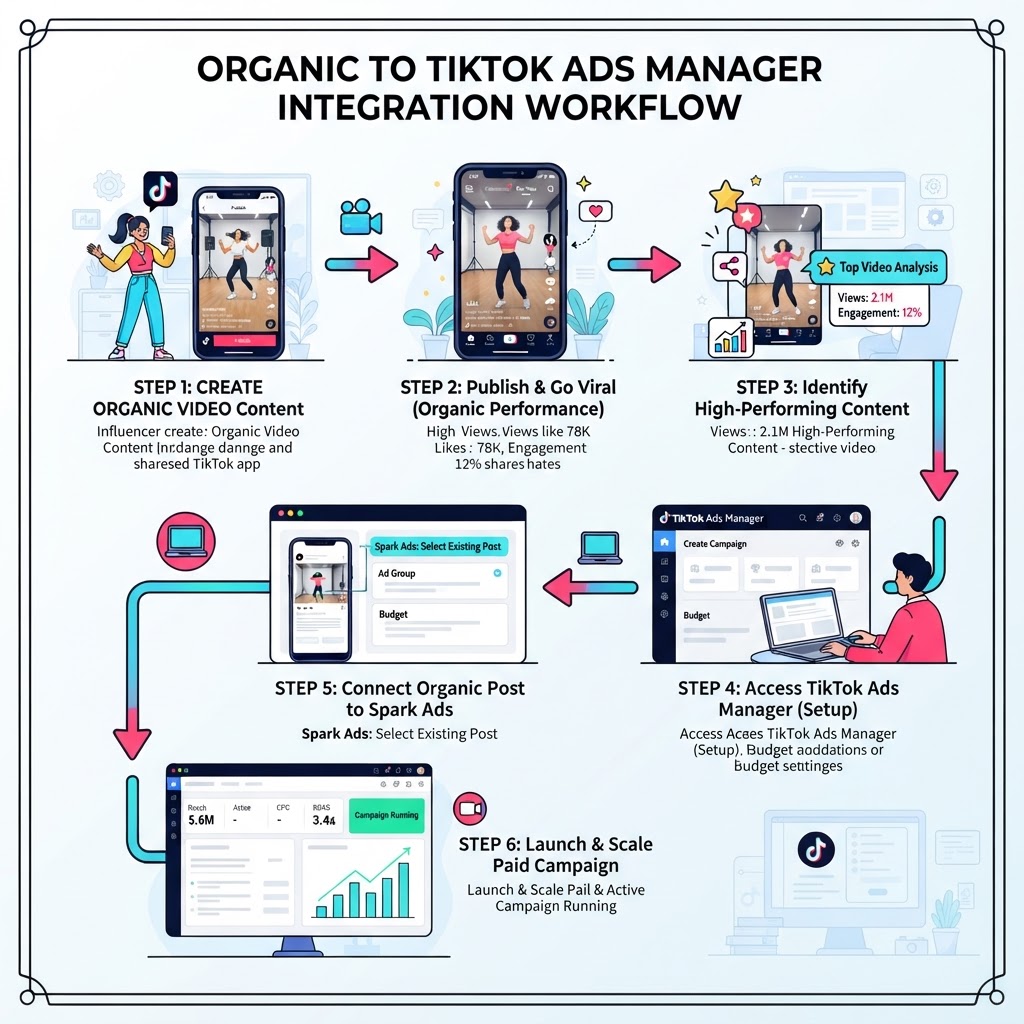
This step-by-step tutorial covers everything from creating your first campaign to getting an authorization code from an influencer, based directly on a walkthrough inside TikTok Ads Manager.
What Are TikTok Spark Ads?
Spark Ads are a native ad format that lets brands and creators promote existing organic TikTok videos rather than uploading a separate creative made only for ads. Because the ad runs on top of the original post, every like, comment, share, and save earned during the campaign stays visible on that post for all your followers to see.
This is the key difference from a standard non-Spark ad, sometimes called a "dark" ad: dark ads run independently and accumulate no public engagement on your profile. Spark Ads build social proof that persists after the campaign ends, which makes your profile look more active and credible to new visitors.
Spark Ads work well for two goals:
- Community growth – promoting videos to gain followers, likes, and comments
- Sales and conversions – driving traffic from a proven organic video directly to a product page or website
Choosing the Right Campaign Objective
Before you touch any creative settings, decide what outcome you are optimizing for. In TikTok Ads Manager you pick an objective at the campaign level, and this shapes every setting that follows.
Community Interactions is the natural fit if you want to grow your follower count or boost engagement metrics on your profile. You are essentially paying for reach and interactions on your organic video.
Sales (manual campaign setup) is the right choice if you run a Shopify store, WooCommerce site, or any other e-commerce destination. You connect your TikTok pixel to the campaign so the algorithm can optimize toward actual purchases rather than just clicks.
For most online store owners, the Sales objective with manual setup gives the most direct return. You can still use Spark Ads creative with either objective—the objective only changes what TikTok's algorithm tries to achieve.
Before running a Sales campaign, connect your pixel first. In Ads Manager go to Tools → Events, then follow the prompts to link your Shopify or WooCommerce store. For a full walkthrough of that process, see the guide on how to run TikTok Ads for Shopify.
Setting Up Your Campaign Step by Step
Step 1 – Create a New Campaign
- Log in to TikTok Ads Manager and click Create.
- Choose your objective—Sales for e-commerce or Community Interactions for engagement growth.
- Select Manual Campaign setup for direct control over bidding and budgets.
- Give the campaign a descriptive name (for example, the product category you are selling).
- Skip split testing and campaign budget optimization for now—those are advanced settings you can add later.
- Click Continue.
Step 2 – Configure the Ad Group
- Under Data Source, select the pixel you have already connected to your store.
- Choose a conversion event that matches your goal, such as a purchase or a button click.
- Under Placement, deselect Global App Bundle and Pangle—keep only TikTok selected. This ensures your Spark Ad stays on TikTok rather than appearing in third-party apps.
- Set your Daily Budget to at least €20 / $25, which is the platform minimum required to give the algorithm enough data to optimize delivery.
- Choose your start time, then click Continue.
Step 3 – Targeting Your Audience
TikTok recommends leaving targeting broad, and that is worth taking seriously. The platform's AI is designed to find the best candidates for your ad automatically, and over-restricting the audience with interest or demographic filters can limit how efficiently the system learns.
At a minimum, confirm:
- Location – you are targeting the right country or region
- Language – matches the language spoken in your video
Operating system targeting is optional and usually unnecessary unless you are promoting an app.
Step 4 – Adding Your Spark Ad Creative
This is where Spark Ads differ from standard campaigns. Instead of uploading a video from your desktop, you pull a video directly from your TikTok account.
- On the Ad level, click Add Videos, then select TikTok Post.
- If your account is not yet linked, click Link TikTok Account, enter the email address associated with your TikTok profile, and confirm the verification code sent to that email.
- Once connected, all posts from your account appear. Select the video you want to promote and click Confirm.
- The video loads into the ad preview so you can see exactly how it will appear in-feed.
- Choose a Call to Action button—options for e-commerce include Shop Now, Visit the Store, Order Now, and Learn More. TikTok will A/B test CTA variations automatically to find what performs best with your audience.
- Optionally add a product information card (image, title, selling points) as an overlay on the ad.
- Paste your destination URL and click the preview link to confirm it opens the correct product page. A broken or wrong URL wastes your entire budget.
- Conversion tracking is already handled by your pixel, so no additional tracking parameters are required unless you use a third-party analytics tool.

Using an Influencer's Video with an Authorization Code
One of the most practical features of Spark Ads is the ability to run paid traffic to a video on someone else's account without needing their login credentials. This is particularly useful for brands working with influencers.
Here is the process from both sides:
What the influencer does on their TikTok app:
- Open the TikTok app and navigate to the video they want to authorize.
- Tap the three dots (share/more options menu).
- Scroll right and tap Ad Settings.
- Enable the Ad Authorization toggle.
- Set the authorization period—up to 180 days per campaign.
- Tap Save, then go to Manage to copy the video code.
- Send the code to the brand (email, message, or AirDrop).
What you do in Ads Manager:
- On the ad creative screen, click Add Post.
- Paste the influencer's video code into the field and click Continue.
- The influencer's video now appears in your ad setup, ready to receive paid traffic.
This approach keeps the ad appearing natively on the influencer's account, which often produces higher engagement than a brand-owned ad, because viewers associate the content with a creator they already follow.
| Feature | Organic Post | Spark Ad (own account) | Spark Ad (influencer) |
|---|---|---|---|
| Engagement visible publicly | Yes | Yes | Yes, on influencer's account |
| Paid distribution | No | Yes | Yes |
| Requires account access | — | Full link | Authorization code only |
| Social proof accumulation | On your profile | On your profile | On influencer's profile |
| Best for | Community building | Sales and growth | Brand + creator campaigns |
What Happens to Engagement After the Campaign
All engagement—likes, comments, shares, and saves—earned while a Spark Ad is running is added to the original organic post and remains visible once the campaign ends. This is a meaningful advantage over dark ads, where all paid engagement disappears from public view the moment the campaign stops.
In practice, this means a video you promote with Spark Ads continues to carry its social proof long after your budget is spent, which can improve organic reach through TikTok's algorithm as well.
Tracking and Optimizing Performance
Once your campaign is live, monitor these core metrics in the Ads Manager dashboard:
- Click-through rate (CTR) – signals how well the video captures attention and drives intent
- Cost per click (CPC) – helps you gauge efficiency of your targeting and creative
- Cost per conversion – the most important metric for sales campaigns; tells you what each purchase or lead costs
If performance is weak, the most common levers are:
- Swap the video – test a different organic post to see if another creative resonates better
- Change the CTA – try a more direct button label if the current one is too generic
- Check the landing page – confirm the destination URL is fast, mobile-friendly, and matches the video's message
- Widen the audience – if you have added demographic or interest restrictions, try removing them and letting TikTok's AI optimize freely
For a broader look at campaign structure and scaling, the TikTok Ads quick-start guide to scaling sales covers bidding strategies and campaign architecture in more detail.
Who Should Use TikTok Spark Ads?
Spark Ads are well suited to:
- E-commerce store owners who already post organic TikTok content and want to drive purchase traffic from their best-performing videos
- Content creators looking to grow their follower count and engagement rate by amplifying videos that are already resonating
- Brands running influencer campaigns who want to put paid distribution behind creator content without managing the influencer's account
They are less appropriate if you have no existing organic TikTok presence, since the format relies on a connected account or an influencer's authorization code.
Recommendation
TikTok Spark Ads are one of the most efficient formats available on the platform because you are amplifying content that already has a proven signal. Rather than guessing whether a new creative will land, you start with organic evidence that real viewers have already engaged with.
If you are an e-commerce brand, start with your top one or two organic videos, set the Sales objective, connect your pixel, and leave targeting broad. Keep your daily budget at the minimum to begin, review cost per conversion after several days, and scale the budget on whichever video delivers the best results.
For those who want to build on this foundation, the guide on how to create TikTok ad creatives that convert covers what makes organic-style video content perform well in paid campaigns.
● FAQ