Discover how Base44 Super Agents automate complex tasks by connecting apps like Gmail, LinkedIn, and WhatsApp. Learn the hybrid agent setup process.
Base44 Super Agents are a browser-based hybrid between traditional AI chatbots and invasive agentic tools like OpenClaw. They connect to your existing apps through secure APIs, execute predefined workflows autonomously, and require no server setup. If you want to stop doing repetitive busywork, you can try Base44 for free.
What Are Base44 Super Agents?
Base44 started as a no-code app builder where you describe an app and the tool builds it for you. Super Agents are a newer feature that extends this into autonomous task execution. Rather than just answering prompts, a Super Agent connects to your tools via API and carries out recurring jobs on a schedule you define.
The key distinction from tools like OpenClaw or Claude Co-work is control. Those agentic systems take over your entire computer or browser—moving your cursor, clicking buttons, reading your screen. Super Agents instead operate within the boundaries you set: read access or write access per integration, nothing more. As Julian notes in the video, many people run OpenClaw on a separate computer because full screen control feels risky. Super Agents avoid that problem entirely by working through API connections rather than browser automation.
Base44 describes Super Agents as "the agent that does it all for you" without requiring any technical setup.
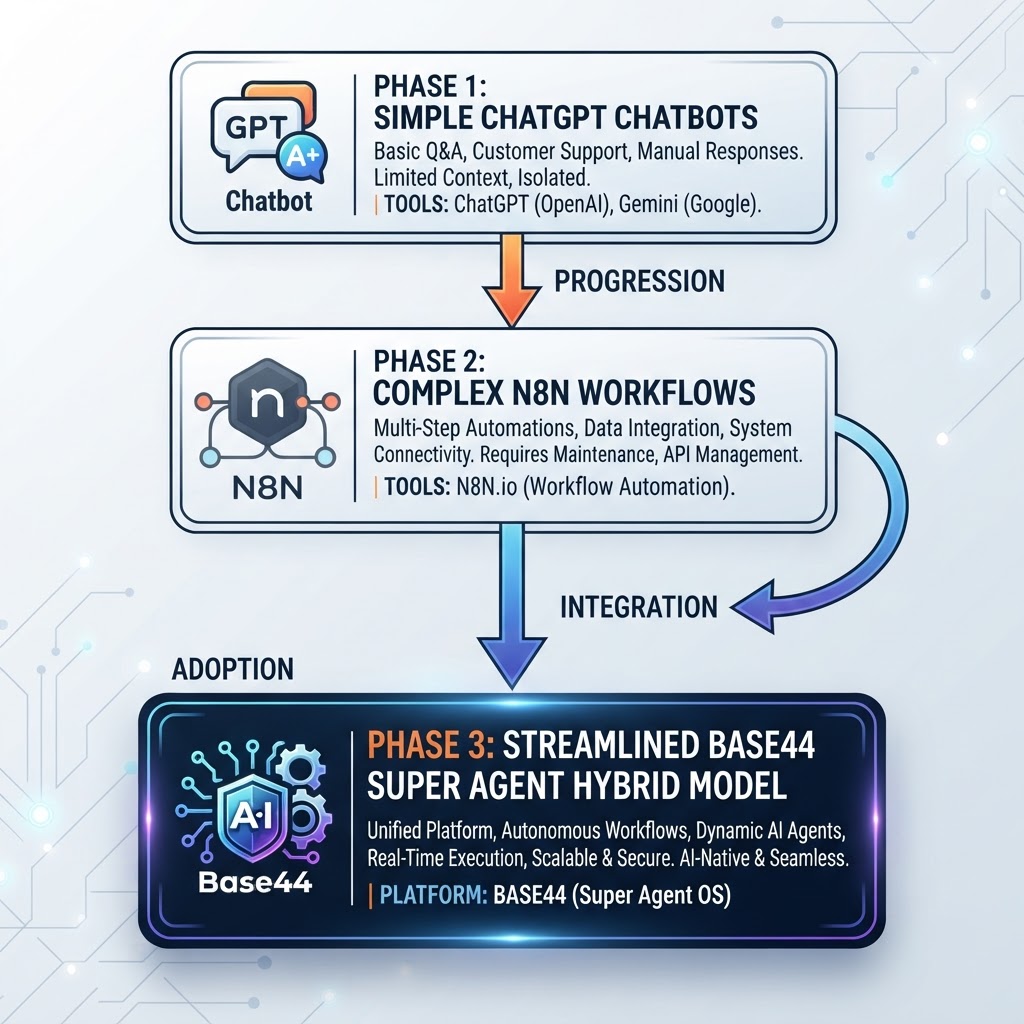
How Super Agents Fit Into the AI Automation Timeline
Understanding where Super Agents sit helps clarify what they are actually good for.
| Stage | Tool Type | Example | Main Limitation |
|---|---|---|---|
| 1 | Conversational AI | ChatGPT, Gemini, Claude | Answers only; no actions |
| 2 | Automation platforms | N8N | Powerful but technically complex |
| 3 | Agentic AI | OpenClaw, Claude Co-work | Full PC control; privacy concerns |
| 4 | Hybrid Super Agents | Base44 Super Agents | Balanced: API-scoped, easy to use |
N8N is a legitimate automation tool for connecting services, but Julian signed up, used it for about an hour, and moved on because the technical overhead was a barrier. OpenClaw and Claude Co-work offer more autonomy but require either a dedicated machine or a willingness to let software control your desktop. Base44 Super Agents occupy the space in between: more capable than N8N for non-technical users, safer and simpler than full agentic AI.
For a broader look at what Base44 can do beyond agents, see the Base44 review 2026.
Setting Up Your First Super Agent
Getting started requires no technical knowledge. The agent walks you through setup conversationally.
- Sign up for free using the link in the description and click "Start Building" to reach the dashboard.
- Create a new agent — the agent immediately asks what you want to call it. Julian named his demo agent Jack.
- Define context — Jack asked for background information: name, profession, work schedule, age. Julian entered that he is a YouTuber who posts tutorials on Sundays. The agent stores this under a "Knowledge" section visible in the "Brain" tab.
- Connect integrations — navigate to the Integrations tab. Available connections include Gmail, Google Calendar, Google Drive, Notion, Slack, LinkedIn, TikTok, Salesforce, and others. Most connect via API key or OAuth. Julian connected Gmail by clicking "Connect Gmail," selecting his account, and choosing read and write access.
- Assign tasks — either give one-off instructions in chat or schedule recurring tasks by describing them in plain language.
At this point the agent behaves like a capable chatbot that also knows your professional context. The real value activates once integrations are live.
What the Brain Tab Contains
- Knowledge: facts the agent has stored about you and itself, including name, role, and preferences
- Memory: accumulated context from past conversations that improves task quality over time
- Integrations: connected tools with their permission levels
- Tasks: scheduled automations with run history, success/failure counts, and a toggle to pause or resume
- Files: files the agent creates for its own automations, including scripts you can inspect
Real Workflows Julian Demonstrated
Content Agent (Jeff)
Julian already had an agent named Jeff running on his German YouTube channel. Jeff's task: every Monday, check whether a new video was posted the previous Sunday, download the transcript, write a LinkedIn post including Julian's affiliate link and relevant hashtags, and publish it. Jeff also drafts a blog post for each video, complete with embedded links and an FAQ section. Julian no longer writes either of those manually.
Email Drafting (Jack)
In the video, Julian instructed Jack: "Please get my latest email and write up a draft for me so in the end I just need to click send." Jack pulled the most recent email—a German-language message from a marketing manager—detected the language, and created a draft reply in German directly inside Gmail's Drafts folder. Julian only needed to review and click send.
Julian then extended this into a scheduled task: "Hey Jack, please every morning at 7:00 a.m. go through my inbox and if there is an important message, just write up a draft for me so I just need to hit send." Jack created a recurring task called "Morning Inbox Review" visible under the Tasks tab. You can pause it with a toggle, and the tab shows how many times the task has run and how many succeeded or failed.
WhatsApp Integration
Base44 also supports connecting WhatsApp or Telegram. From the chat interface, click "Open WhatsApp in the browser," copy the activation code, and send it to the Base44 number in WhatsApp. Once connected, the agent can send you updates and receive your approvals through WhatsApp. Julian described using this to approve LinkedIn posts over WhatsApp: the agent sends the draft, he replies to confirm, and the post goes live on LinkedIn without opening a browser.
For a complete walkthrough of building out these workflows step by step, see the Base44 Superagents automation tutorial.

Available Integrations
Base44 Super Agents connect to tools across several categories:
- Email and calendar: Gmail, Google Calendar
- Storage and documents: Google Drive, Notion
- Social and messaging: LinkedIn, TikTok, WhatsApp, Telegram, Slack
- CRM and business: Salesforce
- Publishing: Wix (Julian uses this to post blog articles directly from the agent)
- Custom: any tool with a public API can be connected via API key
Integration permissions are set per tool. You can grant read-only access to some tools and full read-write access to others, which limits what the agent can actually do and reduces risk.
Credits and Pricing
Base44 operates on a credit system. According to the video:
- Each time you send a message to the AI, one AI credit is deducted.
- Each time the agent performs an integration action (reading an email, posting to LinkedIn, etc.), one integration credit is deducted.
- The free plan, accessible through the signup link, includes 25 AI credits per month and approximately 100 integration credits per month. Integration credits are more generous because the agent spends more time acting than you spend chatting.
- When credits run out, you can upgrade to a paid plan. Credit limits are visible in the dashboard.
Julian does not state specific paid plan prices in the video, so those are not included here.
Strengths and Limitations
What works well
- No server setup; runs entirely in the browser
- Conversational setup with no coding required
- Scheduled tasks with run history and simple pause/resume control
- Language detection (Jack responded in German because the incoming email was in German)
- Growing memory that improves task quality over time
- WhatsApp and Telegram support for mobile approvals
What to keep in mind
- Free plan credits are finite; high-volume use requires a paid plan
- The agent occasionally fails on complex tasks; the Tasks tab logs failures so you can review them
- Capabilities depend on what each integrated tool's API allows; not every action is possible in every app
- Julian noted that easy tasks like email drafting are reliable; more complex multi-step workflows may need monitoring at first
If you are evaluating Base44 against other builders, the Base44 vs Replit comparison and the Base44 vs Lovable comparison cover the differences in detail.
Who Should Use Base44 Super Agents?
Base44 Super Agents are a practical fit if you:
- Handle repetitive communication tasks like email triage, client follow-ups, or social media posting
- Want automation without learning N8N or managing a server
- Find tools like OpenClaw too invasive for daily use on your primary machine
- Work across Gmail, Google Calendar, LinkedIn, Notion, or Slack and want those tools to coordinate automatically
- Prefer to stay in the loop (approving drafts) rather than letting AI act entirely without review
They are less suitable if you need automation that goes beyond what public APIs support, or if you want the agent to interact with software that has no API.
Recommendation
Base44 Super Agents are a genuinely accessible entry point into agentic AI. The browser-based setup, plain-language task definition, and per-tool permission controls make it practical for non-technical users without sacrificing meaningful capability. Julian uses them daily for LinkedIn posting, blog drafting, and email management—tasks that previously required manual effort or external tools like ChatGPT.
The free plan is a reasonable starting point to test whether the agent handles your specific workflows reliably before committing to a paid plan. Start with one integration, run it for a week, and expand from there.
● FAQ